In development · waitlist open
Your dash.
Your layout.
Overdrive is a CAN display for motorsport and tuning. It reads the data from your ECU, and you build the display yourself – with your finger, right on the screen.
Beta test · software for Raspberry Pi 3B + CAN HAT (PiCAN2 or MCP2515-compatible) · Details
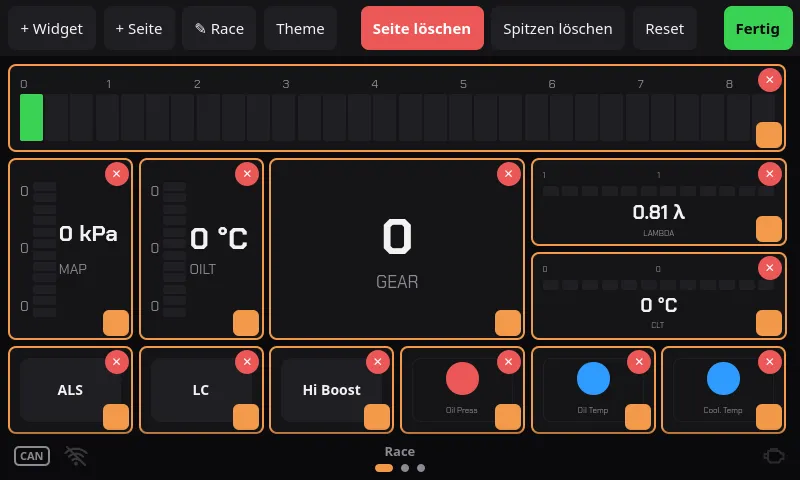
Mockup at the minimum resolution of 800×480 · larger displays work too · runs entirely in your browser
Tip: Press and hold a widget to enter edit mode – then move it, resize it at the orange corner, delete it with ✕ or add new ones via + Widget. Swipe or tap the dots to change page.
New · CAN stream analysis
No DBC? Overdrive just listens.
Not every ECU has a matching DBC file. Overdrive listens on the CAN bus, suggests which bytes are rpm, temperature, boost and so on – and builds your own DBC from them. Right on the display, no laptop needed.
- 1
Listen
Press Start, let the engine run, rev it, switch lights and fan. Overdrive records all CAN frames.
- 2
Assign
You pick a channel, e.g. rpm. Overdrive proposes matching places in the stream – with curve, scaling and match quality.
- 3
Save & use
Name the signals, save them as a DBC, load it. The signals are immediately available in every widget.
Mockup of the CAN stream analysis · click through: New → Start → Stop → Assign
Loaded – these channels are now available in every widget:
The suggestions are heuristics: you check the curve and confirm every assignment yourself. You define your own signals via frame, bytes, Intel/Motorola and factor/offset.
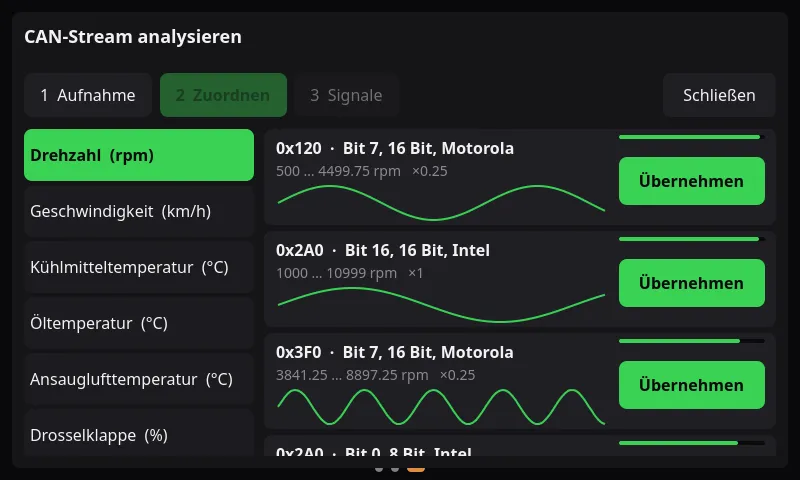
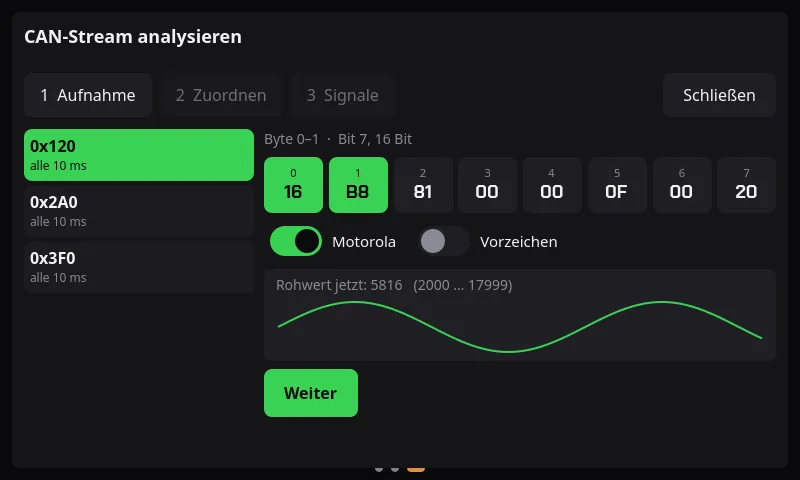
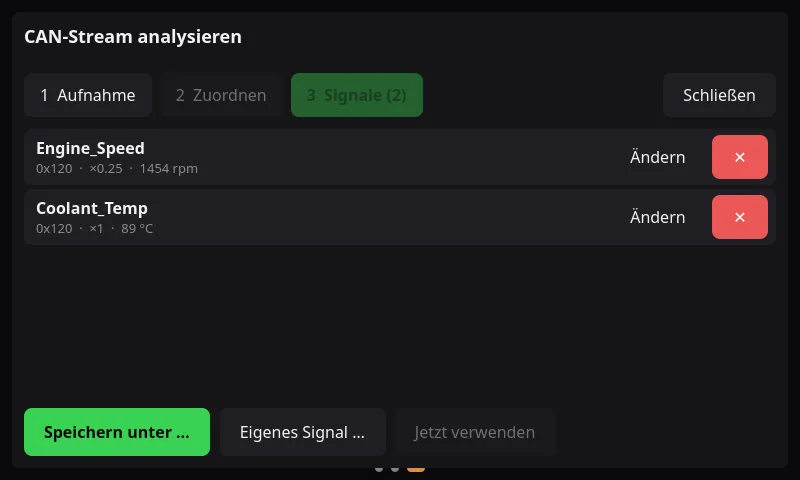
Original screenshots from the running app (currently German UI).
Features
Built like a race dash.
Operated like a smartphone.
- 01
Build by touch
Add, move, resize and delete widgets – right on the display, no laptop. Create and rename pages; your layout survives a restart.
- 02
Your ECU, your DBC
Overdrive reads CAN data via DBC files. Haltech Elite and Ecumaster EMU Black files are included, you upload your own via browser – or build them yourself with the stream analysis.
- 03
Numbers, bars, round gauges
RPM LED bar, digital readout, segment bars, round gauge, graph and warning lights – in the style of the big motorsport dashes.
- 04
Alerts you can see
Warning and critical thresholds turn bars yellow and red, make readouts blink and switch warning lights for upper and lower limits.
- 05
CAN buttons
Buttons send a freely definable CAN frame – e.g. for launch control or a boost map – and light up once the ECU confirms.
- 06
Quick to boot, safely up to date
About 6.6 seconds from power-on to the first frame on the Pi 3B. Updates arrive signed over WiFi; a failed update rolls back automatically.
Straight from the app
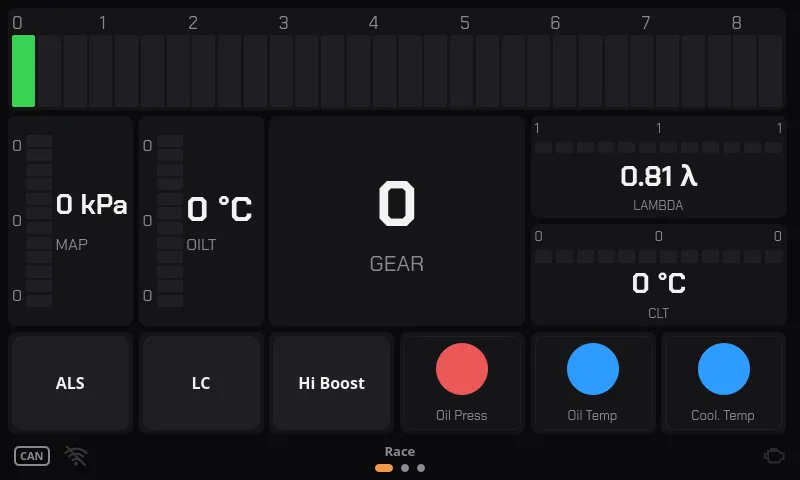
Everything in view. Everything your way.
Rpm, boost, temperatures and warning lights – exactly where you need them. One long press and you rebuild your dash. Real screenshots from the running app.
In three steps
From bus cable to your own dash
- 1
Connect the ECU
Connect the CAN HAT to the bus cable, choose or upload a DBC.
- 2
Build the layout
Assemble pages and widgets by touch, set thresholds and colours.
- 3
Drive
The display starts with the car. Everything stays saved.
- from 800×480
- Minimum resolution – larger displays work too, of course
- ~6.6 s
- Power-on to first frame (Pi 3B)
- Qt 6
- QML interface, no X11/Wayland
- DBC compatible
- Upload your own files via browser
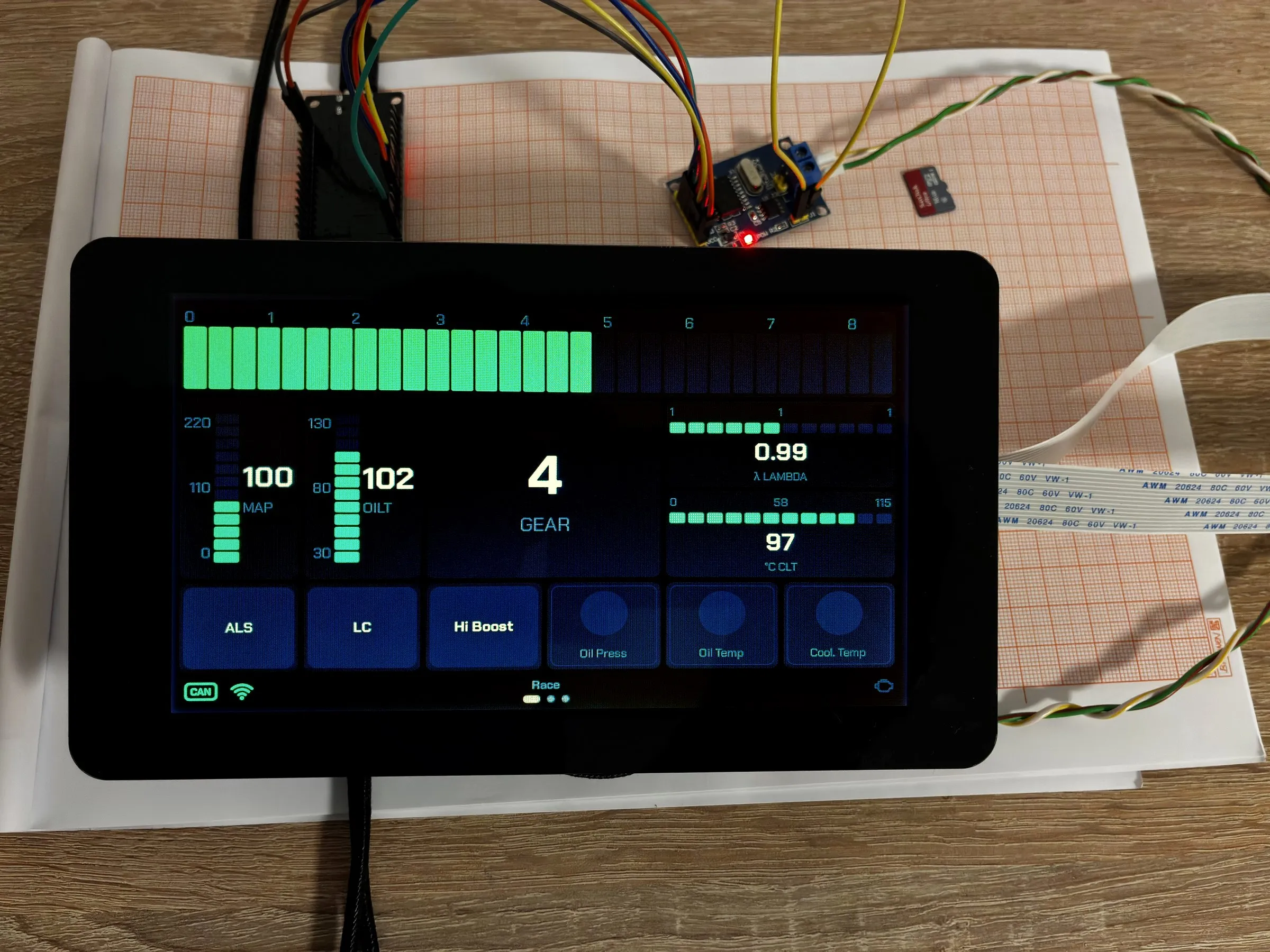
Current hardware: Raspberry Pi 3B with PiCAN2 (MCP2515).
Hardware & beta
Software for your Raspberry Pi.
The Raspberry Pi is inexpensive, widespread and always replaceable – you need no special hardware.
- 01
You bring the hardware
A Raspberry Pi 3B, a CAN HAT with an MCP2515 chip (e.g. PiCAN2) and a touch display from 800×480.
- 02
Software on its own
Overdrive is available as a software licence per device. A complete unit is not required.
- 03
Starting with a beta
We start with a beta test for people from the waitlist. You test, give feedback, we improve.
- 04
Price to follow
We will announce the price at launch. Sign up to be the first to know.
Development status
Overdrive is in the works.
The software already runs on the device (version 0.5.15). Sign up to be the first to hear when hardware and beta spots are available.
- ✓CAN connection & DBC parsing
- ✓Editable touch dashboard
- ✓CAN stream analysis
- ✓Signed updates & licence
- Beta for the waitlist
Wishlist
What should Overdrive be able to do?
These are ideas, not promises. Tick what you wish for – it is sent along when you join the waitlist. What is wished for most comes first.
On to the waitlist ↓ – you can also enter a wish of your own there.
Waitlist
Be among the first.
No spam, no sharing – just a message when there is news.